
Exporting and backups
Download a PDF
Section titled “Download a PDF”Resolve compilation errors, inspect the preview, then choose File → Export PDF. The Export dropdown also offers Download PDF.
Check the downloaded file before sending it, particularly after changing fonts, page size, or bibliography settings.
Download an SVG
Section titled “Download an SVG”Choose File → Export SVG for vector artwork from the preview. Use PDF when you need a conventional document to read, print, or submit.
Keep an editable copy
Section titled “Keep an editable copy”The File menu separates document downloads from publishing and package management.
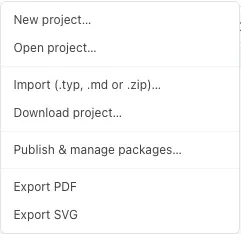
Choose File → Download project…, then choose a ZIP format:
- Build bundle includes the current project files, referenced local packages and their dependencies, a Makefile, and build instructions. Project package snapshots take precedence over matching library versions. Missing referenced packages stop the download with an error.
- Source files only keeps the original project-file layout for importing into Tylor. Account packages and fonts are separate.
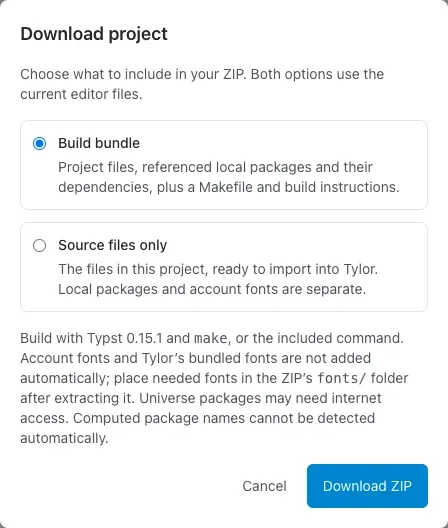
Extract a build bundle, install Typst 0.15.1, and run make in the extracted folder to create document.pdf. The included README also gives a direct command if you do not use Make. Source files are in document/; imports remain unchanged, and local packages are in packages/local/.
The bundle includes font files already stored in the project or its packages. Add any other required fonts to fonts/, respecting their licenses. Account font libraries and Tylor’s bundled fonts are not included automatically. Universe packages may need internet access on first build; computed package names and external diagram services may need manual setup. Check the resulting PDF.
To return to Tylor, import the complete build ZIP. The review lets you add missing package versions to My library while preserving the bundle’s versions with the imported document.
Both formats capture the editor’s current files when you select Download ZIP. Package versions are fetched separately from their published state; in server mode this requires a connection. Neither format contains sharing, comments, tracked-change records, or History. For a frozen PDF and restorable Tylor archive, use submission snapshots and folder backups.
Preserve a fixed submission or approved report
Section titled “Preserve a fixed submission or approved report”For a conference paper, approved minutes, or an class revision sheet, open PDF → Submission snapshots… and freeze a named version. Its PDF stays tied to the captured source even when you continue editing. See submission snapshots and folder backups for the full workflow.
Share a public PDF link
Section titled “Share a public PDF link”Open the Export dropdown and choose Publish public PDF link. Anyone with that link can access the published PDF; it is different from inviting a collaborator to the source project.
The link follows saved project updates. For a fixed submission, download a PDF or use a submission snapshot instead. Unpublish disables future access through the link, but cannot recall files others have already downloaded.
Pending suggestions appear in the proposed document result. Review them before sharing a final PDF.