
Fonts
Add a font
Section titled “Add a font”Open Fonts from the account menu, or Document → Fonts… in the editor. Upload a supported font file that you are allowed to use.
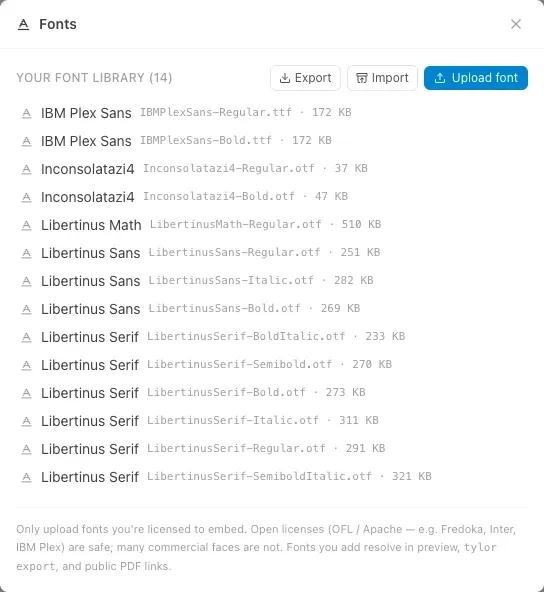
The library lists each face separately, with its family name, filename, and size. Here, Libertinus supports the academic paper and IBM Plex Sans is used in the meeting report.
Choose the font family in your source or the document’s setup tools:
#set text(font: "IBM Plex Sans", size: 11pt)Use the family name reported by the font, which may differ from its filename. Include the needed regular, bold, and italic faces when your document uses them.
Export and import your library
Section titled “Export and import your library”Choose Export to download your library as tylor-fonts.zip. Keep it as a backup, or use Import in another account to restore the fonts you are allowed to share. You can also use Upload font to add individual font files.
If an imported filename already exists, choose Keep existing or Overwrite for each conflict, then Apply. Keep all existing is useful when you only want to add missing faces.
Remove fonts you no longer need
Section titled “Remove fonts you no longer need”Export a backup first. In Fonts, hover over a library row and choose its trash icon, Remove from library. Removal takes effect immediately.
When opened from the editor, Used in this document helps you check the current document’s font references. It is not an account-wide usage report: check your other documents and reusable styles before removing a face. Keep regular, bold, and italic variants that those documents still need. If you remove a needed font, restore it with Import or Upload font and check the preview and PDF.
Wait for required fonts
Section titled “Wait for required fonts”Tylor loads custom font faces as the document needs them. The preview and PDF export wait for required fonts; loading failures are reported instead of silently treating a fallback as the finished output.
A font you have not used on this device may need network access. Reconnect if a required download fails.
Share and move documents
Section titled “Share and move documents”Do not assume that having a font installed on your computer makes it available to a browser or server compiler. Confirm the required fonts are available in the destination workspace, and check the exported PDF.
When moving an editable project, include font requirements in your handoff and respect the font’s license. A PDF and an editable source project have different dependency needs.